BBF on a Canon 5D mark iv

swiftflo

Suspended / Banned
Messages
1,336
Name
Peter
Edit My Images
Yes
Help please.

I have just replaced my camera again and bought another Canon. My last one I had set it up for BBF, struggling with this one to set it up for BBF, can I as hell manage it this time.Can some kind person please help me.

Many thanks.
 
Help please.

I have just replaced my camera again and bought another Canon. My last one I had set it up for BBF, struggling with this one to set it up for BBF, can I as hell manage it this time.Can some kind person please help me.

Many thanks.
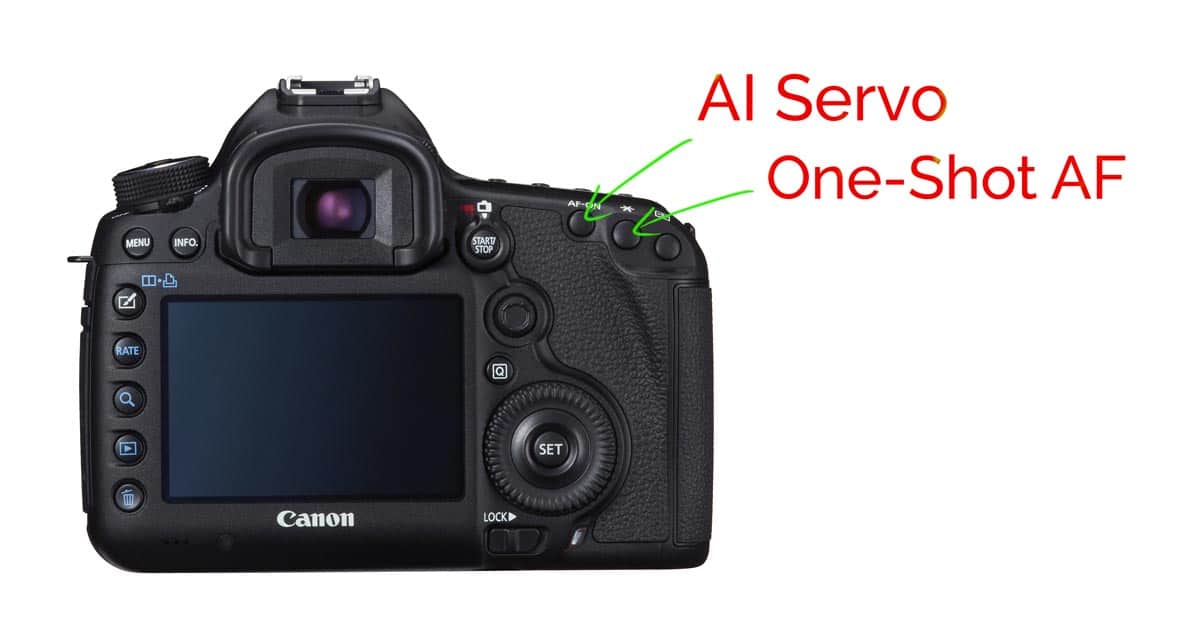
As far as I am aware BBF is already assigned to the AF-ON button, so all you have to do is remove focusing from the shutter button. This is done in Custom Controls which start on page 495 of the user manual.
 
I set mine up but that was several years ago. I am fairly confident it is similar to that described in the link by ST1 above. I found a You Tube which went through this but cannot locate it now (Tony Northrup, I think).

Basically the focus function has been removed from the shutter button. I have assigned BBF to both the AF-On and * buttons, For the AF-On I have a single spot but do have AI servo. This is excellent for mainly stationary subjects (people, landscapes). For the * button I use the full area focus and Auto -track. This is good for sport and birds in flight. It all takes a little getting used to. I did set BBF on my 5D2 but gave up whereas I have stuck with it on my 5D4 and have really benefitted. I have now bought a Sony A6600 to reduce weight but have not set BBF on this yet though may do eventually. I have kept the 5D4 and will still use it in situations where I do not have to carry it any distance.

Dave
 
See custom controls in the manual. Move the AF from the shutter to one of the back buttons same as the 5Diii.
 
Thanks to all of you for your replies.

Now sorted - thanks.
 
Back
Top