Backing up images from memory card to portable storage without a computer

jamesev

Suspended / Banned
Messages
1,216
Name
Jamesev
Edit My Images
No
What are the possible solutions for backing up image files from memory cards to a portable storage device (Portable SSD) when travelling if I don't take a lap top

Available equipment

Camera with USBC
Memory Card Reader
Table (iOS)
Portable SSD (with USB C port)
RAV file hub

essentially I need the simple function that the laptop would provide in moving the files from the memory card to the SSD without the laptop
 
I have an iPad with usb-c and I just dump the memory card to Files on the iPad then plug in the ssd and move the images from Files to the ssd. It’s easy with the later gen iPads
 
Have had the same issue myself, backing up while away
I have tried doing it with an iPad pro using a hub connected to card reader and external drive but copying was extremely slow and gave up trying this , I was trying to copy directly from the card to the external drive though
apparently works with an android phone but I’ve not tried it
Last time I used an external drive that comes with a card reader, made by WD if I remember correctly, not available new anymore but managed to find one cheap on ebay a real shame they aren’t available anymore
This did work well but limited to 500 GB
Does your camera have 2 card slots ?
My camera can (R5) can copy from one card to another am thinking of taking extra SD cards nest time I go away and backing up that way
 
I have a RAV file hub, but no longer use it, it was just too slow and cumbersome.
I now use a couple of options.
For just selectively transferring a few shots for edit, yy current camera (Sony A7iv) has the capability to transfer images via FTP - so I use my Phone's mobile hotspot functionality to create a little local WiFi network linking my Camera and Tablet, then run a FTP server app on the tablet, and I can just send the images wirelessly that way.
For full backup I have a USB-C card reader, which can transfer from the card to tablet, then a USB HD allows me to transfer from tablet to HD. A bit clunky, and relies upon a decen tsized micro SD in the tablet as 'intermediate' storage.
 
I have a RAV file hub, but no longer use it, it was just too slow and cumbersome.
I now use a couple of options.
For just selectively transferring a few shots for edit, yy current camera (Sony A7iv) has the capability to transfer images via FTP - so I use my Phone's mobile hotspot functionality to create a little local WiFi network linking my Camera and Tablet, then run a FTP server app on the tablet, and I can just send the images wirelessly that way.
For full backup I have a USB-C card reader, which can transfer from the card to tablet, then a USB HD allows me to transfer from tablet to HD. A bit clunky, and relies upon a decen tsized micro SD in the tablet as 'intermediate' storage.
I have a 1TB tablet with a good 75% free space available so I might try that method
 
Check the classifieds ;)

Personally, I prefer to take a small MacBook and an external hard drive. The MacBook has a copy of Lightroom, which I set up with a catalog for the particular trip. I then import back to my main Lightroom catalog when I get home.
 
If you want to splash some cash

Only $449 (with CF-A) plus the cost of the internal M2 Drive - Recommended is the WD Blue 2TB - an extra $150, or you can buy one from Amazon for £99
Plus customs and VAT.
It's a neat bit of kit, but far too expensive for what it does, and the pre-installed SD should be cheaper than Amazon, not ~ 50% more expensive!
 
Check the classifieds ;)

Personally, I prefer to take a small MacBook and an external hard drive. The MacBook has a copy of Lightroom, which I set up with a catalog for the particular trip. I then import back to my main Lightroom catalog when I get home.
thats taking a laptop
 
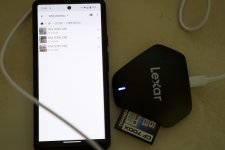
File transfer with a card reader to mobile phone, then phone to the ssd
 
thats taking a laptop
...that's what I do, where appropriate.

I've tried various "pocketable" solutions over the last couple of decades and none are quite as good as a small laptop in a flat profile backpack...

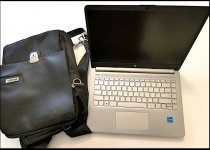
HP lightweight Laptop and Targus backpack FZ82 P1010715.jpg
 
a USB C hub with a USB C card reader and an SSD connected to it plugged into an iPad seems to do the trick using IOS files app to transfer
 
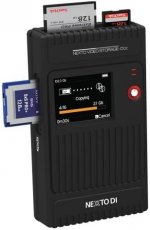
Personally, I have for years used a NextoDI device. The one I have is a NVS2801 Plus (see photo). It is a pro-grade, very rugged card reader connected to a solid state hard drive. It is a no-frills, no-nonsense device, very easy to use, no bells and whistles but does the job very reliably and impeccably. I can only recommend it. Small, lightweight.


41IpX3QZnnL._AC_.jpg
 
£1400 though...
 
I copy files from a SD card via card reader to a Samsung tablet with a 128gb micro SD card.
Then copy those files by a cable connection from the tablet to a Sandisk SSD.
Used this method for ages on my travels and never had an issue.

Once home copy everything straight from the SSD to a PC.
When everything is checked and ok I delete files from the tablet and card
 
Last edited:
Personally, I have for years used a NextoDI device. The one I have is a NVS2801 Plus (see photo). It is a pro-grade, very rugged card reader connected to a solid state hard drive. It is a no-frills, no-nonsense device, very easy to use, no bells and whistles but does the job very reliably and impeccably. I can only recommend it. Small, lightweight.


View attachment 445430

I had one of the older models 15-20 years ago when I used Compact Flash. It was a good (and only) solution then, but it seems they are completely discontinued now and Nexto are defunct

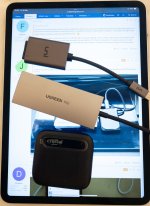
Today I use an iPad Pro, a USB C hub with a built in SD reader and an external SSD drive. It is not super fast, but it works well enough.
 
I had one of the older models 15-20 years ago when I used Compact Flash. It was a good (and only) solution then, but it seems they are completely discontinued now and Nexto are defunct
I am sorry to hear that and so I hope my device will last for many more years, as it is absolutely great! Given that photographers on the go need to backup and that no everyone wants to encumber themselves with portable computers, I would have thought some clever Chinese company would have upheld the torch... :rolleyes:
 
I am sorry to hear that and so I hope my device will last for many more years, as it is absolutely great! Given that photographers on the go need to backup and that no everyone wants to encumber themselves with portable computers, I would have thought some clever Chinese company would have upheld the torch... :rolleyes:
I suspect that given how cheap and easy it is to do the job via a mobile phone using a cheap card reader and portable drive, the market for a dedicated device is not large enough to be profitable. The Chinese companies manage low prices in part through high volumes, and while there would be a market for such a device, it wouldn't be large enough to bring the price done enough.
 
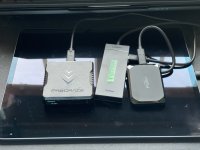
I just backed up hundreds of today’s photos In my hotel room in Seville in a few minutes this evening, with no trouble at all

A better (10Gbps) USB hub has made a world of difference to speed compared to the last time I did this in 2023. It’s practically as quick as my desktop setup,
 

Attachments

  • IMG_2511.jpeg
    IMG_2511.jpeg
    438.6 KB · Views: 14
Last edited:
I just backed up hundreds of today’s photos In my hotel room in Seville in a few minutes this evening, with no trouble at all

A better (10Gbps) USB hub has made a world of difference to speed compared to the last time I did this in 2023. It’s practically as quick as my desktop setup,
haha - apart from the card reader a very similar config
 

£94 at Wex


But then you have to add £50-£100 :for the card reader module and £300 for a 2TB SSD module (or 4TB £479)

Close to £500 all in at minimum; I suppose for some people it could be worth it for the convenience :-/
 
Last edited:
I did spot that, You can get a CFExpress 4.0 reader from Amazon for £84, and I think you could potentially plug in an external SSD to one of the Type C ports, so might not be that big an investment. I suppose it all depends on how much you want to pay for the convenience of not lugging around a laptop.
 
I suppose it all depends on how much you want to pay for the convenience of not lugging around a laptop.
I was quite interested when I first looked at the advert but once I realised what it actually does and what it costs to make it do that, my interested waned rapidly.

Maybe one of the far eastern companies will come out with a cheaper and perhaps even better solution.
 
Back
Top