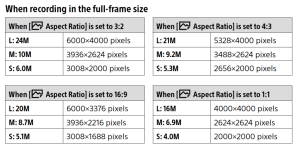
Aspect ratios and pixels

Crotal Bell

Suspended / Banned
Messages
3,470
Name
Keith
Edit My Images
Yes
I was just watching a review of the Canon M5, the chap said that he chooses aspect ratio 3:2 as the others are crops and don't give you the full 24MP

Is this common on most cameras and do you need to choose your aspect ratio with care?
 
AFAIK all Canon interchangeable lens cameras use a 3:2 ratio sensor......with digital on many (all?) bodies you can select to shoot in other ratios that are a crop of the above.

I was a Canon user but now as an Olympus user the ratio of the sensor is 4:3 but for me, coming from Canon, I set my camera to 3:2 ratio as I like the compositional benefits it gives me.

Of note as I shoot raw the camera will record the full 4:3 ratio.....and this is great because in my post processing if my framing in camera was a tad sloppy I have the whole of the 4:3 to crop to 3:2 as I see fit!

Now to the more salient points IMO
Though I don't print a huge amount, when I do I am either printing a 3:2 ratio or 1:1 ratio print. So as mentioned above because my crop will vary I don't want to lose a single pixel that the sensor gives me :)

As for whether 'you' have choose your crop (ratio?) that is your choice but I would never rely on the camera to do it ~ everything IMO needs to be a choice in the post processing.

In summary don't let the camera rule you.....in your shoes (as I say above) I would keep to the 3:2 and if I want to crop to an unusual crop ratio I can choose to do so ;)
 
All cameras have a 'native' aspect ratio, governed by the shape of the sensor. All others are created by cropping either the ends or the top & bottom of the frame so you lose pixels. In the mainstream ranges I think everything has a native aspect ratio of 3:2 except Micro FourThirds which is 4:3.

Selecting a 3:2 ratio on a 20MP MFT camera gives you roughly 17MP. It's up to you to decide whether this is significant or not.
 
Last edited:
I wouldn't worry too much about cropping to get the aspect ratio you want unless you're doing a massive crop or want to view a large picture close up and see fine detail. I think that if you're keeping the image size reasonable and not cropping heavily going from 3:2 to 4:3 of vice versa or for some other crop for aesthetic reasons will very possibly still leave enough information for a lot of people and uses.
 
What you have read is correct, and is true of every camera I'm aware of, if you choose a ratio other than native you are not going to get the full megapixels, however I wouldn't worry about it too much as even a 1:1 crop gives you 16mp on a 24mp camera which is more than enough for most applications. For example, a 4k screen is 'only' 8.3mp.

That being said I always shoot in the native ratio and then crop in post if I choose to. If shooting raw some cameras preserve the original aspect, so even if you choose 4:3 on a 3:2 camera you can still retrieve the original 3:2 full megapixel frame.

Here's how many megapixels are on the different ratios and different image sizes on the A9ii, I'd imagine all 24mp are very similar/the same.

Screenshot 2022-09-05 at 08.59.27.png
 
Last edited:
It would be nice if they all did but. Nikon DSLRs certainly don't. I also had two Panasonics - one did the other didn't.
I stand corrected. I always thought my Nikons did, must be my memory playing tricks on me ;) Actually, I don't even think I've tested my Sony, I'll rephrase my post (y)
 
I was just watching a review of the Canon M5, the chap said that he chooses aspect ratio 3:2 as the others are crops and don't give you the full 24MP

Is this common on most cameras and do you need to choose your aspect ratio with care?

It’s a common feeling I think that people feel they are ‘wasting’ pixels by not using the native ratio but if, for example, you know you are going to end up with a 1:1 then it makes no difference whether you do it in camera or in computer later.
 
What You've read/watched is correct. I only use two aspects ratios on my camera, 3:2 & 1:1. There are a couple of reasons for this, firstly, 3:2 and 1:1 works best compositionally for me in my type of photography and secondly, I find it better/easier for printing. It's really quite rare that I'll crop an image, but if I do I keep the same aspect ratio.
 
Some ratios (IMO) don’t look right in a vertical format, I much prefer 4:5 for portrait orientation shots compared with 2:3 - it’s all a matter of personal choice

Unless you are going to print really big or crop very heavily then just about any format/crop will be fine
 
What you have read is correct, but if you are shooting in raw then the crop is not baked into the image and you can change it in LR (or whatever other Raw processor you use)

3:2 aspect ratio is the native ratio for most Canon cameras so changing that to 4:3, 4:5, 1:1 or 16:9 means that you will be cropping pixels from either the top and bottom or the left and right.

Personally, I don't worry about it. I use the aspect ratio in the camera to help with framing. I prefer a 4:5 for vertical shots and depending on the scene will pick square 1:1, 16:9, 3:2 or 4:5 but I have the option to change my mind when I'm back home.

As with any cropping you will loose pixels but with the high pixel count of cameras these days, it's not really an issue.,
 
I always shoot the the aspect ratio of the sensor.

However I am not an aspect ratio freak. I can always crop to the what ever is best for the image. or that is needed for the output requirements.
But it makes sense to use the whole sensor when shooting, whatever that happens to be..

Of course when you shoot stitched pans the aspect ration can be just about anything. but must always take in to account what works best for viewing and printing.
narrow slot like images almost never work, and almost always work better with additional rows. to give a more natural view.
It is almost always better to take pans with the camera in portrait orientation. with the possible exception of a two shot stitch.
 
What you have read is correct, but if you are shooting in raw then the crop is not baked into the image and you can change it in LR (or whatever other Raw processor you use)

3:2 aspect ratio is the native ratio for most Canon cameras so changing that to 4:3, 4:5, 1:1 or 16:9 means that you will be cropping pixels from either the top and bottom or the left and right.

Personally, I don't worry about it. I use the aspect ratio in the camera to help with framing. I prefer a 4:5 for vertical shots and depending on the scene will pick square 1:1, 16:9, 3:2 or 4:5 but I have the option to change my mind when I'm back home.

As with any cropping you will loose pixels but with the high pixel count of cameras these days, it's not really an issue.,
I thought this too but @Ed Sutton said above this can't be done on Nikon DSLR so I've just done some research and according to a thread on fred miranda Nikon does NOT preserve the original frame for some reason (y)
 
Last edited:
I thought this too but @Ed Sutton said above this can't be done on Nikon DSLR so I've just done some research and according to a thread on fred miranda Nikon does NOT preserve the original frame for some reason (y)

I'm not familiar with Nikon at all so I'll have to take his word for it.

The OP has a Canon M5 so this shouldn't be an issue for him.
 
What you have read is correct, and is true of every camera I'm aware of, if you choose a ratio other than native you are not going to get the full megapixels, however I wouldn't worry about it too much as even a 1:1 crop gives you 16mp on a 24mp camera which is more than enough for most applications. For example, a 4k screen is 'only' 8.3mp.

That being said I always shoot in the native ratio and then crop in post if I choose to. If shooting raw some cameras preserve the original aspect, so even if you choose 4:3 on a 3:2 camera you can still retrieve the original 3:2 full megapixel frame.

Here's how many megapixels are on the different ratios and different image sizes on the A9ii, I'd imagine all 24mp are very similar/the same.

View attachment 366062

Pedant. 5328*4000 isn't exactly 4:3 - it should be 5328 x 3996 to get the correct aspect ratio.

They're also a pixel out on the 16:9 - it should be 6000 x 3375 to get the correct aspect ratio.

When I crop, I make sure the pixels exactly tally up with the chosen crop. ie to get a true 4:3 on a D850 you need 7336 x 5502 - as 5504 is the most it has on the short side, but that doesn't evenly divide into 3. If you want to make a 7x5 - you need to ensure the short side is cropped 5500 so you are long 7700 - so again - it is true exact ratio not a very close one.

If you want to be really accurate on this, you need to ensure the number of pixels on the long and short side of your crop divide evenly without remainders into the integer of the aspect ratio - nothing less than that will do in my workflow.

Edited for typo's - which make me look like a fool.
 
Last edited:
Pedant. 5328*4000 isn't exactly 4:3 - it should be 5328 x 3396 to get the correct aspect ratio.

They're also a pixel out on the 16:9 - it should be 6000 x 3395 to get the correct aspect ratio.

When I crop, I make sure the pixels exactly tally up with the chosen crop. ie to get a true 4:3 on a D850 you need 7336 x 5502 - as 5504 is the most it has on the short side, but that doesn't evenly divide into 3. If you want to make a 7x5 - you need to ensure the short side is cropped 5500 so you are long 7700 - so again - it is true exact ratio not a very close one.

If you want to be really accurate on this, you need to ensure the number of pixels on the long and short side of your crop divide evenly without remainders into the integer of the aspect ratio - nothing less than that will do in my workflow.
Your numbers don't add up mate.
 
Back
Top