Any issue deleting previews for Lightroom?

snerkler

Suspended / Banned
Messages
26,078
Name
Toby
Edit My Images
No
I've noticed that previews in LR are taking up quite a bit of space on my hard drive and I'd like to free it up if I can by manually deleting the preview files. Will there be any major consequences doing this? It's unlikely I'm going to re-edit these files again, but even if I do won't LR just build new previews anyway? I realise this will slow the process slightly but I'm not worried about this for the odd file that I might want to re-edit.
 
No problem getting rid of the previews except for slowing things down.
 
There should be no problem with this method I use it day in day out, I shoot passport,driving licence id photos etc in the studio here tethered to lightroom once photos are taken and 6 up passports or photos are printed off or emailed.. I delete the previews and am ready for the next customer walking through the door and just file the raws away incase someone at the passport office or wherever rejects something and the customer happens to have to come back for some reason..although never happened yet..
 
Also delete after 30 days. LR just builds them as needed if they don't exist.
 
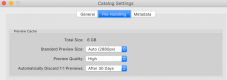
I have my catalog set to delete the 1:1 previews after 30days... I have 1:1 previews built on import and no other sizes are generated. You can set it for 1day, 1 week, 30days, or never.

View attachment 140377
I have 1:1 deleted after 30 days but didn’t realise that you could set it so it’s 1:1 only, how do you do this?
 
I have 1:1 deleted after 30 days but didn’t realise that you could set it so it’s 1:1 only, how do you do this?
On import you select the size of previews LR generates. If it's 1:1 LR doesn't need to generate smaller ones... If it's set to standard or some other size, then LR will also generate a 1:1 on demand. At least that's my understanding...

Screen Shot 2018-12-15 at 7.04.48 PM.png
 
I have my catalog set to delete the 1:1 previews after 30days... I have 1:1 previews built on import and no other sizes are generated. You can set it for 1day, 1 week, 30days, or never.

View attachment 140377

Wow! how did I not know about this! cheers! :O I'm forever trying to clear space too, but I do like LR to give me 1:1 preview. I don't mind the initial start up time as I just go whip up a snack or do the dishes while it loads :D
 
On import you select the size of previews LR generates. If it's 1:1 LR doesn't need to generate smaller ones... If it's set to standard or some other size, then LR will also generate a 1:1 on demand. At least that's my understanding...

View attachment 140380
Thanks, I didn't realise selecting 1:1 automatically stopped the others. Does it still create smart previews, or does it stop these too?
 
Back
Top