Beginner Another Lightroom Classic on Mac Question on Deleting Old Software

russellsnr

Suspended / Banned
Messages
3,121
Name
Russell
Edit My Images
Yes
Hi, Lightroom Classic question.
I upgraded DXO to version 3 but version 2 still shows in the list of available software although I deleted it along with On1 Photo Raw, that also still shows in the list of options to select from Lightroom Classic, is there a way to remove from the list on a Mac those deleted software please? Thank You, Russ.
 
Where is it being shown? As options to "edit in" in Lightroom? A screenshot might help explain the issue...
 
Where is it being shown? As options to "edit in" in Lightroom? A screenshot might help explain the issue...
Hi, don't no how to screen shot on a Mac, no where it is but once selected cannot open Lightroom options to show list,
The list is under Plug in Extras when wanting to open a 3rd party app like DXO pure raw.
Thank You.
 
Hi, Lightroom Classic question.
I upgraded DXO to version 3 but version 2 still shows in the list of available software although I deleted it along with On1 Photo Raw, that also still shows in the list of options to select from Lightroom Classic, is there a way to remove from the list on a Mac those deleted software please? Thank You, Russ.
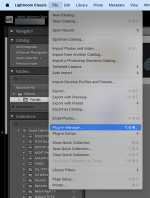
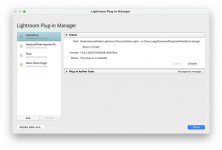
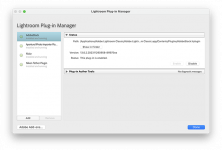
Go to the plug-in manager and in the window that opens you should be able to select the plug-in that you want to delete.

Screenshot 2023-12-15 at 19.07.26.pngScreenshot 2023-12-15 at 19.07.42.png
 

Attachments

  • Screenshot 2023-12-15 at 19.07.42.png
    Screenshot 2023-12-15 at 19.07.42.png
    93.8 KB · Views: 1
Hi, don't no how to screen shot on a Mac, no where it is but once selected cannot open Lightroom options to show list,
The list is under Plug in Extras when wanting to open a 3rd party app like DXO pure raw.
Thank You.
Here you go

 
Back
Top