And now a Lightroom question from me!

Janice

Suspended / Banned
Messages
11,626
Name
Janice
Edit My Images
Yes
I can't make HDR shots by starting in Lightroom and creating a 0, +2 and -2 shots. They just dont work right when generating the hdr shot in photomatix.

I have to do it in Rawshooter Premium still...as this allows me to set it so the metadata is stripped from the shots.

Lightroom doesnt..there is no preference to do this.

Has anyone managed to use Lightroom for successfully starting HDR shots?
 
Hmm...I've never had to strip metadata from any TIFF before putting it into Photomatix.

I've just had a quick try at creating 3 exposures from one RAW in Lightroom and they loaded into Photomatix fine as well.

:shrug:
 
Well they load....but the resulting photo looks odd...very different from when its done thru rawshooter.

mine looked odd in rawshooter too until I set it to strip the metadata from the RAW files.
 
Do you have CS2?

Is File > Automate > Merge to hdr any easier?
 
Do you have CS2?

Is File > Automate > Merge to hdr any easier?

No :) Janice I've found that Photomatix is a bit odd. If you goto file and open it doesn't notice that the EXIF is the same and makes a bad HDRI. If you goto HDR, Generate and then load the images that way it will notice and ask you what the exposures should be. If that doesn't work you'll have to load each file into Photoshop and then copy the image into a new file. A slow way of stripping the EXIF.
 
Thanks Pete,....thought it was just me!! :lol:

A slow way of stripping
sounds good to me!! :D :lol:

N1ntend0....I can't do it through photoshop, it always says that the photos dont have enough dynamic range (even though there is a 2 stop difference between each one) .
 
N1ntend0....I can't do it through photoshop, it always says that the photos dont have enough dynamic range (even though there is a 2 stop difference between each one) .

Photoshop reads the EXIF data and doesn't see the under and overexposed shots when its done from one RAW file as the EXIF data is the same, thus photoshop thinks theirs no dynamic range difference in the shots.
 
Photoshop reads the EXIF data and doesn't see the under and overexposed shots when its done from one RAW file as the EXIF data is the same, thus photoshop thinks theirs no dynamic range difference in the shots.

That's how I thought it worked, but with Photomatix, when it encounters no EXIF, it gives you the option to input the exposure compensation manually.

I've only done one or two HDR's, and if I'm honest, I have no idea how I did it!
I did follow petes guide at the time though.


As for exporting from Lightroom with no EXIF, that's a puzzler for me too.
 
That's how I thought it worked, but with Photomatix, when it encounters no EXIF, it gives you the option to input the exposure compensation manually.

Yes it does..... but I never know what to do...because I make the shots with 0, +2, and -2 compensation. then when I open in photomatix...it says it has detected 1 AV difference do I want to keep that?

I dont know whether to trust it, or whether to type in 2AV difference as I know best!! :lol: ???
 
I personally don't trust it. If I know I've exported from RAW with 0, -2, and +2, then I would override in Photomatix and say "OI! MUSH! NO! YOURE WRONG!"

(Or some such comedy southern phrase)
 
Yeah Harry Enfield and Paul WHitehouse "Oi Photomatix, NO!! " :D :lol:
 
I had the same problem when I tried to create an HDR and just assumed I was being thick. So, if I have lightroom and CS2 can I easily create an HDR from 1 Raw file?

Is it worth buying photomatix? and if so what is the workflow for Lightroom users?
 
Just what I was saying Peter....I cant get it to work from lightroom.
but in Rawshooter I can. :shrug:
 
If you use Photomatix 2.3.3 and load the files by HDR menu, then generate it'll work. At least for me it does. It will then ask you which one is which.
 
If you use Photomatix 2.3.3 and load the files by HDR menu, then generate it'll work. At least for me it does. It will then ask you which one is which.

It does work Pete...it generates...but the outcome isnt quite the same as doing it from rawshooter.

aha i have version 2.2.4 perhaps thats the prob.
 
It could be. I have both 2.4 and 2.3.3 and only 2.3.3 seems to detect the same EXIF and question the settings if you open the images via HDR -> Generate.
 
Thanks Pete,....thought it was just me!! :lol:

sounds good to me!! :D :lol:

N1ntend0....I can't do it through photoshop, it always says that the photos dont have enough dynamic range (even though there is a 2 stop difference between each one) .

That's something new I've learned today - so a good day, sorry I butted in and wasn't any help.
 
sorry I butted in and wasn't any help.

No such thing as butting in on this site, we all help each other and learn a lot along the way! :thumbs:
 
I had the beta version until it expired but I'm struggling to find where LR fits into my workflow, I have CS2 (soon to be CS3) for any manipulation plus Capture NX for the really tricky raw conversions (Control points are soo powerful) so the manipulation side is well covered, add Photokit & PK sharpenner as my only add- ons to PS.

I previously used PS album as the best of a bad bunch of programs to organise and catalog images, I'd buy LR if it only organised images but not at the current asking price as it does some of the stuff that PS CS2 does - why duplicate?

Am I missing something? I did resent buying Capture NX but it saved my bacon recently and has more than paid for itself from the one job I needed it for.
 
I love Lightroom for organising images. I keep most files as Raw files and only create JPEGs or TIFFs if I want to print, put online or edit in CS2.

This HDR problem is my only gripe...
 
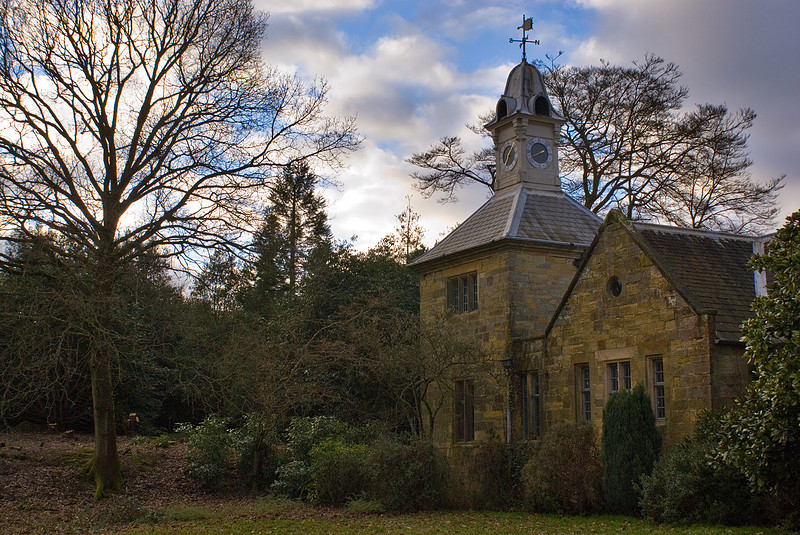
I've created this:

p1049758412-4.jpg


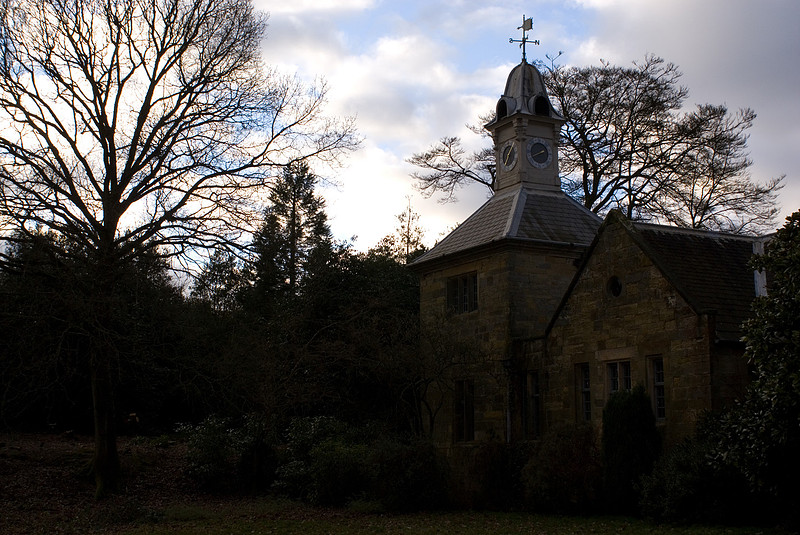
from this:

p664664440-4.jpg


by developing an underexposed and an overexposed photo in lightroom and then merging them in photoshop. Is that what you're after? If so I can post a link to the technique I used. If not just ignore this post :D
 
The technique is this one:

http://www.nwpphotoforum.com/ubbthreads/information/php/2007_Articles/rjohnston/roman2.php

The basic premise is you create 2 versions of the photos (virtual copies in lightroom works brilliantly for this)- one where you expose for the shadows and one where you expose for the highlights - and then you blend them together in photoshop. I think it works fairly well provided you don't push it too far. The photoshop blending part takes less than 5 minutes once you understand the steps, so its well worth trying out. The end photo often needs a little work with levels/curves because it can look a little flat but that never takes long.
 
Back
Top