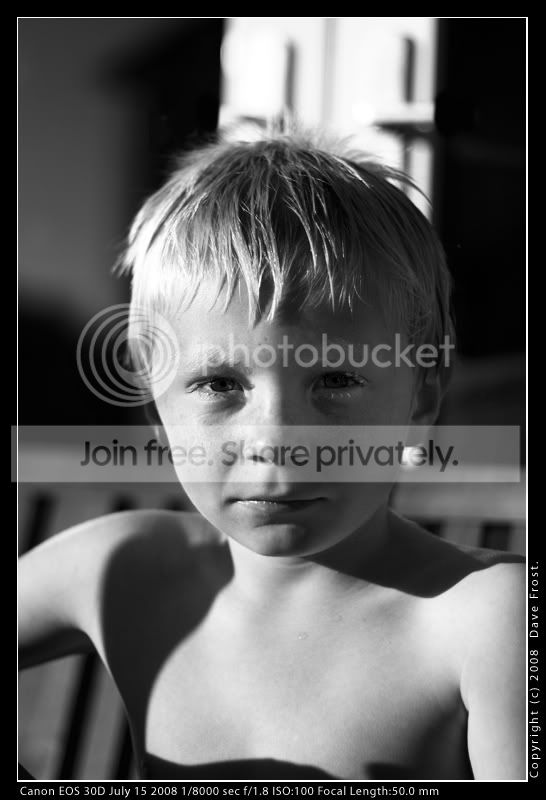
A lesson in poor planning - Advice on rescuing this one please

yoby

Suspended / Banned
Messages
1,254
Name
Dave
Edit My Images
Yes
This shot of my son serves as an abject lesson in reminding me again that I need to slow down and think about the full frame of my composition rather than just the subject. I'm pretty rubbish at post processing, other than running scripts, a bit of level tweaking and resizing so would really appreciate some advice on how (if possible) to rescue this one.

First problem is obviously the door handles sprouting out of his head.
Second obvious problem is the harsh shadow - Could I dodge or burn this (which one lightens it).

Failing that an honest, it isn't worth the hassle of the processing would be equally appreciated.

Thanks

2673350263_b0fe1b330e_o.jpg
 
Had a bit of a play,mananged to get this out of it.

2673350263_b0fe1b330e_o.jpg
 
that's what I was trying to achieve with the shadow. Would it be possible to tell me how you did that?
I re-cropped it to get to of the handles and am currently trying to clone the rest of the White bit of door out. But every time I mess with the contrast, brightness or curves I end up destroying it.

Cheers
 
The world hates a smart-arse :lol:. Seriously, nicely rescued, excellent result.

:thumbs:
 
Doozie, :clap:
I've wasted a good few hours at work with this today, and even longer yesterday and never got close at all. Your edit is exactly what I was trying to achieve. Could you give me a run down on how you got rid of the white and recovered some detail from the shadow

I did manage to get rid of most of the white in my "best attempt" using the clone tool, but also managed to give him a square head....
Really like to get this result on the full size version so I can get it printed for the grandparents...
 
Good edits fellers - just need to bring those eyes out a bit to show who this guy is. ;)

edit1.jpg
 
Loving all these edits, but they do leave me thinking "Yebbut How????"
Feeling woefully inadequate - Really need some pointers here chaps.........

CT - Found Hacker's Make those Eyes pop tutorial - Bookmarked for tomorrow - there goes another morning's work....
Will try again with the shadow thing, but as far as the white door is concerned, may just have to alter the crop as that's the bit I'm really messing up...... Do I clone it or dodge it or just select it and paste black over it. Could I use the tool that selects everything that's the same colour (not sure what it's called) and avoid chopping his hair off?
 
If you're really struggling with that door the easiest thing to do is just draw a mask taking in the door, the surrounding dark area and a bit of the top of his head. Feather the mask by a few pixels. (you might have to do a bit of trial and error for the best amount of feather)

Select the dark shadow area as the background colour with the eye dropper colour picker thingy, then just go up to 'Edit' and 'Cut' should leave you with a clean dark shadow area and no door. You'll lose the stray hairs on top of his head but it should look OK with a feathered mask.

Keeping the stray hairs is a PITA tbh and needs a fair bit of practice.

I'll do you a pick of the mask. :)
 
My take on the cloning, it isn't going to be easy to remove the white pillar to be honest.

2677706519_9962f9912b_o.jpg
 
Masks.jpg


Draw the mask just as it's shown in the top pic

Feather it by 15 pixels- it will expand to how it is shown in the 2nd pic.

Select the shadow area as the bg colour and just cut out the area within the mask.

Bob's you Auntie. :thumbs:
 
alternatively, you could crop the whole lot out... I personally feel that the tighter crop works well with the boy's intense look.

recrop.jpeg


cheers,
sancho
 
that's what I was trying to achieve with the shadow. Would it be possible to tell me how you did that?
I re-cropped it to get to of the handles and am currently trying to clone the rest of the White bit of door out. But every time I mess with the contrast, brightness or curves I end up destroying it.

Cheers

No, a magician never reveals his secrets.....good job i'm not a magician then eh :lol:;)

All I did was use some of the colours around the door to remove the handles, by brushing them over with a feathered paint tool. As for the heavy shadow on his face, I grabbed the dodge tool with a brush size of about 300, and just clicked lightly around that area of his face. I think I gave it about 3 clicks, then saved it.

I find that working with much larges brushes than needed always avoids messy edges. Hope this helps.
 
Awseome - Thank you all so much. Confidence restored, and hopefully with all of your excellent advice I'll be able to get a printable result.....

I'll let you know how I get on.
Thanks again....
Dave
 
Right,
Taken about an hour to get this far, but definitely improving thanks to your advice. If I can the Hair as good as Doozie's I'll be happy. As you can see it still needs improving, but coudn't have got this far without your help.

Thanks again, and happy Friday.......

2679648582_6c908742b6_o.jpg
 
Well done! :thumbs: The only way is just to keep trying - it does get easier. Watch those eyes though, they're looking a bit unnaturally bright , particularly on the shadow side of the face.
 
Personally I like the high contrast image better, it has much more moodiness.

Well I have to agree. I was going to comment, but didn't want to sound picky and discouraging. It's obviously lit by very strong light from the left of the frame, and you only really want to reduce that light enough to avoid burn out as much as you can. If you take it too far the pic starts to look unreal. The left of the face (our right) need to remain quite a bit darker than the right or it begins to look at odds with the very strong shadows being cast on his chest and shoulders.

In all fairness, it's not an easy image to sort out though.
 
I'd third that, you should use the shadows and high contrast to your advantage, rather than try alter it beyond recognition. It takes away it's integrity.

However, if you do proceed down this route, then you need to sort out the shadow that his head creates, for consistency.

(did no one like the tight crop?)
 
Well I have to agree. I was going to comment, but didn't want to sound picky and discouraging.

Ah yes, tact was never my strong suit. :)

I think that the image can be 'fixed' quite easily if it was shot in raw by applying a custom curve or some gamma correction during conversion. The jpeg image doesn't have enough data to recover the detail without the posterization that you see in all of the above. How to do this will depend on which raw converter OP is using.

Personally I would be tempted to go the other way and increase the black point to accentuate the contrast.

The crop isn't bad but I think the space works better.
 
Doozie, :clap:
Could you give me a run down on how you got rid of the white and recovered some detail from the shadow

I did manage to get rid of most of the white in my "best attempt" using the clone tool, but also managed to give him a square head....
Really like to get this result on the full size version so I can get it printed for the grandparents...


I selected the area above the head and around the hair as best I could, I always (usualy always) make selections using "Paths" and the "Pen tool" as you can always go back and reselect after de-selecting or alter the selection expand/feather etc.

Feathered by I think 1 or 2 pixels. Then adjusted with "levels" and the "Burn tool". Then used the colour picker on another part of the hair and manualy added some stray hairs back in with the paint brush.
 
Thanks for all the positive comments here, and yes, to a certain extent the I also agree with the higher contrast view. The biggest problem I had with it are the large white patio doors behind him which for me at least ruined it completely. Once I'd started I did get a bit carried away, especially with the eye popping nwhich was something I'd never tried before....
Of course, for this particular photo (and the edit I posted) it was quite inappropriate.

It was indeed shot in RAW, and I use Capture One 4.0 (thanks to Sandisk) I've got a few different recipes saved from messing with that as well. Quite happy with RAW editing, but PS stuff just leaves me dead, though I'm practicing more than I used to.

Tried a few crops as well, but nothing really leapt at me. Still trying different things with this, and as long as I can keep the white doors out I'll be fairly happy with it....

With one of the Edits, I kept the shadows etc. pretty much as shot, upped the contrast a bit and then added some noise. It turned out to be quite effective - But that's now on the laptop in the office. Once the kids have gone to bed this evening, I may well end up having another crack at it.

Thanks again for the input.
Dave
 
Stray hairs - sometimes the smudge tool can help with these, especially if they are slightly out of focus. Have the tool really, really tiny - hair sized and use it to drag out individual hairs and then use the blur tool on about 20-50% opacity to blur it slightly. You can also use the paintbrush for this if you have a lot of different colour hairs and use the selector to get the colours - time consuming but often worth it
 
Hope you don't mind, I'm bored so thought I would have a play as well...

pauledit.jpg


Lasso'd
Dodged
Burnt
Curves
 
Lasso'd
Dodged
Burnt
Curves

DONE.....

Gordon Ramsay, eat your heart out......

Absolutely don't mind at all - Spent a goodly portion of the weekend messing with this, and have yet to finish anything I'm happy with.

Seem to be leaning to the cropped version(s) (there's only so many times you can mess up removing something before cropping it out) but can't quite manage that "yeah" factor...... Even 'her who notiseth nothing' has started to comment on the various printed versions and has made some useful suggestions so at least this one shot has generated some interest on the home front......

Still mucking about with it and will definitely post the ones I'm least unhappy about for review.....

Sod the photography, getting a keeper out of this shot is my new hobby....


(Apologies for typo's, bad grammar, rubbish typing, and somewhat contradictory opinions. Had a great lunch)
 
Back
Top