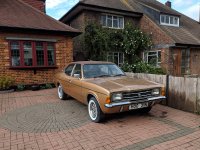
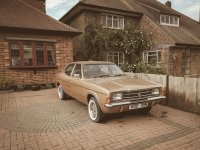
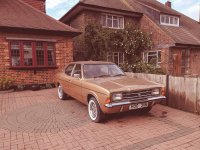
70's style Photo's

sajo

Suspended / Banned
Messages
94
Edit My Images
Yes
My O/H is considering buying a mark 1 cortina and is looking to put a blog together on the work she will do on the car.

She wants me to shoot photo's to be included but is looking for 70's style photography, short of using a film camera I'm a bit unsure where to start. Is there a filter that could help? Also she has spoken about a white frame around the photos. Generally I use a Canon R, and for editing tend to use either Lightroom or PS.

Any suggestions at this stage would be appreciated as its not something I've tried before.

Thank you in advance.
 
If you want a seventies 'look' the best way is to use a seventies camera. Of course it will have to be film and if you've not used it before there will be a small learning curve involved.

The white edge comes at the printing stage after the negatives have been developed. It is an option that should be readily available from any D&P outfit.

Of course, you could cheat and just do it in Lightroom, but where's the fun in that?
 
many editing packages and plug-ins offer film emulation modes which attempt to replicate a particular film type, and even "gimmiscks" like cross-processing. Some such endeavours are more successful than others :)

Adding the white border is very easy in photoshop or similar, just increase the canvas size by a small amount
 
The free version of Nik filters might be worth checking out. If you're interested and can't find your way to download it let me know as I think I have a link somewhere.
 
Pure supposition on my part but perhaps you will need to create your own interpretation of a 70's 'look', though maybe there are some free PS presets?

Also, there is the DxO FilmPack that might be worth a look?
 
Perhaps add some ‘edited’ Polaroid images?
 
I think it's find an image you like and try to work out what's been done to it!

Sometimes a different white balance, reducing saturation and some split toning can make a nice older looking effect. I used to do it a bit myself at one point.

I'm very interested in you doing this though. I have a Mk1 Escort and I think a Mk1 or Mk2 Cortina would be my second choice!
 
Makes me feel old Lee, I’ve owned all three of those in my youth! And a Mk3, and Mk4 Cortina :)
 
If you are into Lightroom there are bucketloads of presets like these free ones https://presetsgalore.com/product/70s-80s-retro-inspired-lightroom-presets/

I can't remember where I got mine, but I don't think it was those, I tend to avoid freeware preferring instead commercial products from a reputable software house, but I suspect these would be an easy intro

ETA - Actually I think these are the ones I have, and they are pretty effective
 
Last edited:
Last edited:
Pure supposition on my part but perhaps you will need to create your own interpretation of a 70's 'look', though maybe there are some free PS presets?

Also, there is the DxO FilmPack that might be worth a look?
This.
Also, bear in mind that back then the vast majority of people only had 1 lens, a 50 mm - so consider taking all shots with a 50mm equivalent and zoom with your feet, because you wouldn't be able to crop in Photoshop either. Viewpoint can make a massive difference.
 
Odd decision to go with a "70's look" for a MK1. Isn't it more of a 60's car?

In terms of achieving it, you could either take the shots on your R and google PP settings for LR. Or maybe use an app like Hipstamatic (if you're an iPhone user).
 
Odd decision to go with a "70's look" for a MK1. Isn't it more of a 60's car?

In terms of achieving it, you could either take the shots on your R and google PP settings for LR. Or maybe use an app like Hipstamatic (if you're an iPhone user).
Yes, it was a 60's car and was a great one at the time.
I started working as a photographer in about 1962 and can tell you that 60's and 70's photography was the same. The technology was static and styles were conservative until David Bailey and his friends took a different approach from about 1960, but he was working in a very specialised field and it took many years before other people adopted his approach.
 
A couple of screen grabs from Color Efex Pro. The first shows film simulations available and the second shows further adjustments you can make.

VMqXipB.jpg


eVChrrT.jpg


You get similar choices in Silver Efex Pro for B&W.

UdDncEJ.jpg
 
Last edited:
I downloaded the presets pack linked up above. Installed, clicked through each one on an image, and then deleted the whole folder.....

All pretty extreme and not nice looking imo

I think just pick a soft, non digital looking style of your own and go for that.
 
Yes, it was a 60's car and was a great one at the time.
I started working as a photographer in about 1962 and can tell you that 60's and 70's photography was the same. The technology was static and styles were conservative until David Bailey and his friends took a different approach from about 1960, but he was working in a very specialised field and it took many years before other people adopted his approach.

High end stuff maybe, but results from consumer cameras definitely had a different 'feel'.

I wasn't alive to go through it, but recently scanned a shed load of images for my Nana's 100th birthday, for my mum's 70th and for my Aunty's 60th.

All the shots from the 60s looked much truer and, weirdly, more modern.

Almost everything from the 70's was orange. (Although from memory, Fujifilm used to give everything a slight green-ish hue).

Aside from the fashions, it was pretty easy to pick out the 70's shots. All IMHO OC.
 
Last edited:
I downloaded the presets pack linked up above. Installed, clicked through each one on an image, and then deleted the whole folder.....

All pretty extreme and not nice looking imo

I think just pick a soft, non digital looking style of your own and go for that.

Are you talking about the Nik ones? If so you do know they're adjustable?

If you are talking about Nik filters I'm baffled by "extreme" as you can set just about everything including the level of effect. There must be tens of thousands of different combinations and levels of effect you can set from having no visible effect at all through to making your eyes bleed in 0.2 seconds. I suppose it's like setting your camera up really as you can stick with the defaults or wade through the options and once you're sorted it's a breeze as you can then save your choices and apply them to more pictures or tweak them more to suit.

Oh well :D
 
I downloaded the presets pack linked up above. Installed, clicked through each one on an image, and then deleted the whole folder.....

All pretty extreme and not nice looking imo
Agree those Nik filters are horrible.

@sajo

The easiest way to create a film type look is to firstly try and take the photos during golden hour when the light is soft, and the colours naturally give the setting an almost film like tone.

From an editing point of view

  • Import the RAW Images into Lightroom
  • Bring Down the Clarity slightly
  • Adjust the Blacks & Whites Using the Tone Curve
  • Adjust Colours Using the HSL Panel
  • Add Grain
If you want a specific film look like say for example Fuji, Portra etc. Maston labs do a range of lightroom presets that will help you achieve that look very easily and then you just adjust to suit.
 
Are you talking about the Nik ones? If so you do know they're adjustable?

If you are talking about Nik filters I'm baffled by "extreme" as you can set just about everything including the level of effect. There must be tens of thousands of different combinations and levels of effect you can set from having no visible effect at all through to making your eyes bleed in 0.2 seconds. I suppose it's like setting your camera up really as you can stick with the defaults or wade through the options and once you're sorted it's a breeze as you can then save your choices and apply them to more pictures or tweak them more to suit.

Oh well :D

I've never ever used any Nik filters. I was talking about the Lightroom ones Alan :)
 
thanks guys, really appreciate the comments, and the tips. At the moment I'm a little incapacitated following breaking my ankle 5 weeks ago today. Once I'm up and about properly were hoping to go and check out the car that O/H wants to buy, if its a go'er, then that's when the fun begins...
 
Odd decision to go with a "70's look" for a MK1. Isn't it more of a 60's car?

In terms of achieving it, you could either take the shots on your R and google PP settings for LR. Or maybe use an app like Hipstamatic (if you're an iPhone user).
Yes you're correct it is a 60's car. Thing is, it's the car her Father had in the 70's when she grew up, so in a way it's more a recreation of that car.
 
Your best bet is probably preset browsing then adapting one to suit your own taste.

For authenticity then a vintage prime or two adapted for your current body would probably be a good starting point but if you start with an image with odd reflections and soft edges no amount of PP will put it right again so take backups with a modern lens if you're not sure.

I sometimes break out a "Holga" reproduction for my M43 camera. It's pleasingly rubbish - soft at the edges, vignetted, slow but it's also fun to use and produces an instant vintage look which I can enhance if I choose.
Cheap too.
 
Agree those Nik filters are horrible.

In your opinion :D

I'm not a great user of them and don't use them for even 1% of my pictures but to say that something that's about infinitely configurable is horrible seems a bit OTT as the results are completely in the hands of the user, what selections are made, where the sliders are and even what part of the picture you apply changes to. Oh, and it's free which help if someone only wants to use it for the odd shot or every single one.
 
thanks guys, really appreciate the comments, and the tips. At the moment I'm a little incapacitated following breaking my ankle 5 weeks ago today. Once I'm up and about properly were hoping to go and check out the car that O/H wants to buy, if its a go'er, then that's when the fun begins...


5 weeks ago? Leaves you about a week to play with a few PP solutions to find some settings that work for you!
 
In your opinion :D

I'm not a great user of them and don't use them for even 1% of my pictures but to say that something that's about infinitely configurable is horrible seems a bit OTT as the results are completely in the hands of the user, what selections are made, where the sliders are and even what part of the picture you apply changes to. Oh, and it's free which help if someone only wants to use it for the odd shot or every single one.

There is a reason it is free. It wasn’t good even when it was current which is a long time ago now. Time moves on, software in particular improves with every release.

Yes just my opinion. I could have used others words as well like ridiculously bad, awful, a crutch for those who don’t know how to use Lightroom and Photoshop correctly etc. but I though horrible covered it quite well.

In terms of the actual software it is ridiculously ineffective in producing “film like” results no matter how much you play with their sliders.

Anyway I have already provided the O.P with the information he needs to produce the effect he is looking for, including how to do it with Lightroom which most photographers already have without having to buy anything else or having to install software that isn’t designed to run on newer operating systems.
 
Last edited:
There is a reason it is free. It wasn’t good even when it was current which is a long time ago now. Time moves on, software in particular improves with every release.

Yes just my opinion. I could have used others words as well like ridiculously bad, awful, a crutch for those who don’t know how to use Lightroom and Photoshop correctly etc. but I though horrible covered it quite well.

In terms of the actual software it is ridiculously ineffective in producing “film like” results no matter how much you play with their sliders.

Anyway I have already provided the O.P with the information he needs to produce the effect he is looking for, including how to do it with Lightroom which most photographers already have without having to buy anything else or having to install software that isn’t designed to run on newer operating systems.

Yup. It's just your opinion and others are available although they maybe wont be as definite or as colourful.
 
I think a lot of it will depend on composition as much as anything else.

For these to work, it may not need to be absolutely period correct in terms of the look, but if you can set up a shot where there are no modern distractions, then I think it will help sell the illusion.

Not sure what/where you had in mind.
 
Isn't a lot of the effectiveness of the effect based on the subject as well? We are talking about reproducing the effect of age on the picture, making it look like one you found in that box so they really shouldn't look "nice" and is an effect you'd have to be suspiciously obtuse to want to inflict on an image for to make it look good (Lomo? someone say Lomo?). Snapshots (because that's what they were) back in the day were of things like people or cars, and you never snapped away like we do with digital. Anyways up, I dug out a snap of a local 2000E, just the sort of thing we are discussing.

Here's the straight from camera

IMG_20190426_181208.jpg

Now, a 70s preset from the link I posted, no tweaking although as noted, you are at liberty to do so.

IMG_20190426_181208-2.jpg

Now an 80's

IMG_20190426_181208-3.jpg

No, they aren't "nice" but they are a reasonable simulacrum of what the OP was looking for, to my eye the 70's one in particular does a good job of that. close but no cigar? try the others, try tweaking the sliders.
 
I wish I knew what a seventies style photo is.

Unfortunately, I was taking pictures throughout the seventies so I can't remember anything about them. :thinking: :naughty:
 
To get a true 70's look I use a true 70's camera, so film (with dirty negatives!) and B&W would still have been quite prevalent! If you do stick with digital, there are a ton of 'get the vintage look' youtube tutorials out there :)
 
Just pick up an old polaroid camera of the bay and some new old stock film packs for it, you can't get more authentic than that.
 
If your camera can use 'vintage' lenses (adapted to camera) that could be an option. Lots of 70's lenses that can be picked up for cheap. Obviously easier to use a preset but old lenses will give you a bit more authenticity.
 
There is a reason it is free. It wasn’t good even when it was current which is a long time ago now. Time moves on, software in particular improves with every release.

Yes just my opinion. I could have used others words as well like ridiculously bad, awful, a crutch for those who don’t know how to use Lightroom and Photoshop correctly etc. but I though horrible covered it quite well.

In terms of the actual software it is ridiculously ineffective in producing “film like” results no matter how much you play with their sliders.

Anyway I have already provided the O.P with the information he needs to produce the effect he is looking for, including how to do it with Lightroom which most photographers already have without having to buy anything else or having to install software that isn’t designed to run on newer operating systems.

Very dismissive, arrogant and rude response to someone trying to help. NIK software is pretty good, especially for free and if you spend time in understanding how it works and how to use it properly.
 
Back
Top