36"x 12" is it possible in photshop

debrito

Suspended / Banned
Messages
1,410
Name
Paul
Edit My Images
Yes
hi I have seen a frame in my local shop id i think i have a photo to fit it at least i think i have !!!!!!!
how can i get this photo below to that size or am i dreaming and what size should i ask for when ordering ? sorry if this sounds daft
:shrug:
30Oct2009_29242.jpg

:bang:
 
36x12 sounds very rectangular to me ?
The 10 megapixel file from your A200 Will print at roughly 13" x 8.5" At 300ppi

If you go bigger the quality will decrease, but this is subjective and many people print much larger without any issues. It all comes down to subject matter and viewing distance.

There's some information on this topic Here

Im sure people with more first hand experience at printing can offer some better real world advice though.
 
I do not think the 36*12 format will suit this image as you will be loosing a lot of the surrounding details that make the image. With that size and crop you will be loosing foreground detail and most of the tree tops.

If you would like to see what I mean, when you are in photoshop, select your crop tool and in the value boxes for width and height, place in there 36in and 12in and then draw you crop tool over the image.

I think you should be looking to keep the 3*2 size or something along those lines, do they do a 36*24 frame.

Regards

Nigel
 
thanks for your input
what about this idea
30Oct2009_2924.jpg

does that look ok
 
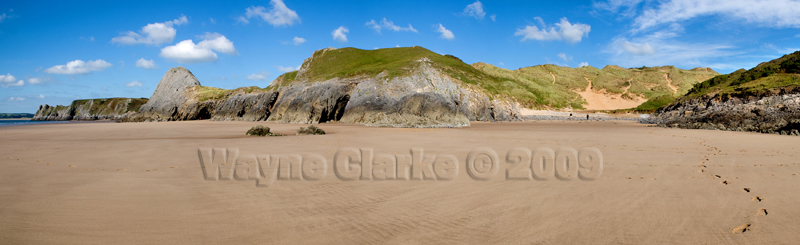
If I'm honest it doesn't work for me, why not make a panorama for the frame and just get a normal frame for this?
 
A panorama is where you "stitch" several photos together to make a long thin image (or to show a wide vista of landscape maybe) this shot was 5 or 6 shots combined in photoshop.

4060815159_b3b67f8664_o.jpg
 
Heres another idea, make a triptych of your image, split it into 3 parts and fit it into the 36x12.

4060842175_0cf02851d3_o.jpg
 
36x12 sounds very rectangular to me ?
The 10 megapixel file from your A200 Will print at roughly 13" x 8.5" At 300ppi

If you go bigger the quality will decrease, but this is subjective and many people print much larger without any issues. It all comes down to subject matter and viewing distance.

There's some information on this topic Here

Im sure people with more first hand experience at printing can offer some better real world advice though.

Setting aside the 'question' of does the A200 have the image resolution to make such an image the page you link to does qualify the question of ppi (or dpi as many refer to it as). Think viewing distances - an image printed at 150dpi if viewed at say minimum of say 5 to 6 feet will look just fine and as that site says a 10MP image at 150dpi would be approx 25" x 17" ~ you are not going to be looking at that with your nose touching it are you!

Best of luck with however you end up getting a max size possible print.
 
36x12 is no problem for most modern cameras.

Your camera produces images that are 3872 x 2592 pixels. Now you will need to crop that image to make it fit 36" x 12"

So the image you will have will be close to 3872 x 1291 pixels.

This equates to printing at 107ppi (no interpolation) which to be honest for an image that size is fine. I may though be tempted to resize my image to print at 150ppi = 5400 x 1800pixels.

I like swanseamale's idea.

Please remember that dpi is different to ppi. What people above are talking about should be termed pixels per inch. dpi is a printer term.
 
Is the 36" x 12" the size of the frame, or the size of the aperture in the mount?

Using software like genuine fractals, you will be able to meet the required filesize for printing, but obviously you will lose a bit of image from the top and bottom.

What software do you use for post processing?
 
ok 1st of all thankyou for all you comments
frame is either 36 x 12 or 362 x24 now i like the look of 36x12 but im not bothered its just the process of how to get there i supose if i got the frame and it didnt work i could just put 3 landscape 4x6 in there

haveing said all that you ideas have been greatly welcomed but you have lost me
i have phtoshop but i have never stiched anything together in photo shop and to be honest im leaning i dont suppose it would cost alot to print out would it ?
 
Debrito
Don't worry about using "genuine fractals" or anything else. For what you are doing you will get perfectly acceptable results using Ps. Let your lab do any upscaling that may be required for the image you want.

If you need a 36x12 image then just go to the crop tool in Photoshop. Enter 36in (to the width box at the top) and 12in (in the height box). I'd be inclined to enter 150 into the ppi (resolution) box. You really don't need any more for such a large print - in fact leaving the box blank would work too.

Maybe sharpen slightly if required and then save it. Email it to your lab with a request to print it 36x12 and they will do the rest.
 
Back
Top