2 versions of photoshop

RKC

Suspended / Banned
Messages
4,399
Name
Bob
Edit My Images
Yes
Hi, when opening images in photoshop via lightroom used to be no problem, recently sometimes photoshop freezes, if I open photoshop first then no problem.
What I have discovered is that I have 2 versions, no idea why or how guessing an update, wondering if when opening via lightroom it freezes because it does not know which version of photoshop to use.
Can I uninstall the old version?

1576085346691.png
 
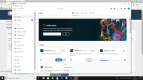
Since updating Photoshop cc the other day, I also have 2 versions and an having trouble editing from LR to PS. My Adobe cc app thingy shows that I have 2 versions and is asking me to update the older one (because I missed out updating the last update before the new version came out).
 
  • Like
Reactions: RKC
When mine updated to 21.0.1 it asked if I wanted to delete the old version.
I would be tempted to delete the old version ,if you let it update you might end up with two versions of the new one and how that will work is anyones guess.
At least with creative cloud itscan easy job to reinstall PS if needed.
 
  • Like
Reactions: RKC
Yeah noticed that today as well but it’s not caused me any problems up to now
 
  • Like
Reactions: RKC
I uninstalled my old version without any issues.
 
  • Like
Reactions: RKC
Not just me then, thank you for the replies, deleted the old version and result so far, opened in photoshop via lightroom with lightening speed like it used to
 
Bob, I still have both versions of Photoshop showing and when I'm moving from Lightroom to Photoshop it always chooses the latest version. Not had a problem like you mention.

Now, having said that, I can just imagine everything going wrong tomorrow.
 
Back
Top