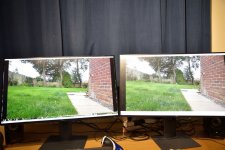
2 monitors

realspeed

Suspended / Banned
Messages
8,827
Name
Bazza
Edit My Images
No
duelaa.JPG

Quickly set up last night so no calibration (as from factory settings), no editing as taken on my Nikon D810. No editing or anything. same video capture from 4K video. left hand monitor is 4K right is 1080p monitor. Did this just to see the difference Both are Dell monitors 27" and IPS screens so angle makes no difference
 
Last edited:
It’s very difficult for us to see any difference due to the compression etc. I would recommend you describe in words what you saw. All I notice is that the left monitor has a more vivid green
 
Last edited:
FWIW

The two screens are angled a tad differently (as evidenced by the shadows cast) and therefore the room lighting is reflected differently!

Yes, green on the LHS one is deeper and zoomed in the LHS one looks sharper.......though on my old Dell 2209wa I had to adjust the out of box 'sharpness' setting.

Other than that and as @Mintchocs asks ;)
 
Left one, more vivid green and brick work, better controlled highlights (top left corner) of each picture...but...

No panels are the same, you have two different panels of differing resolution, and probably different brightness settings. You'll need to manually calibrate until they both look the same.

Re clipping whites and blocking blacks, you can turn on an indicator in LR, or whatever you edit with to show these. It's the colour settings that really matter, but you can do some easy online screen tests to get you close to where you need to be
 
I have two identical monitors side by side and both give very different representations of colour and contrast without them being calibrated and even then they aren’t identical.

There is a reason why “professional” grade monitors are so expensive, as they are built to be consistent, whereas normal day to day monitors are not.
 
Back
Top