


Shoreline
Suspended / Banned
- Messages
- 62
- Name
- Martin
- Edit My Images
- Yes
Hello, I have read about 10 different explanations of how to do this but I still cannot find a definitive answer that I can understand so I'm posting this in desparation hoping that someone can set me straight.
My 7D puts out an image measuring 5184 x 3456 pixels on current settings.
Let's say I want to get the highest quality print I can at around A4 size using DS Colour Labs.
Their website says I need to resize my file to 3510 x 2475 @ 300dpi for A4
I don't have Photoshop or Lightroom yet, I just have Paint.net. The dialogue box for resizing images looks like this:
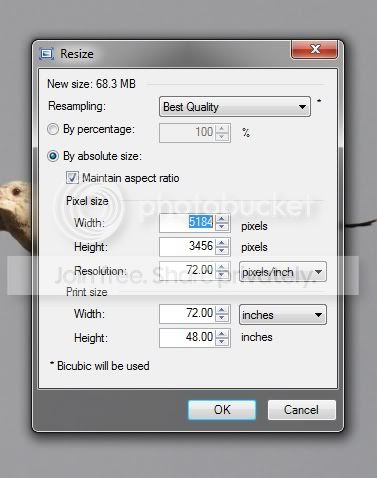
So the question is: do I simply reduce the pixel dimensions from 5184 x 3456 to 3510 x 2475 and ignore the 'Resolution' box - where it says 72 pixels/inch? Or do I have to alter that as well before I can send them the file?
I know this subject gets a lot of enquiries but I can't say I'm surprised given the amount of conflicting adivce there seems to be out there.
Thanks in advance for any help.
Martin
My 7D puts out an image measuring 5184 x 3456 pixels on current settings.
Let's say I want to get the highest quality print I can at around A4 size using DS Colour Labs.
Their website says I need to resize my file to 3510 x 2475 @ 300dpi for A4
I don't have Photoshop or Lightroom yet, I just have Paint.net. The dialogue box for resizing images looks like this:
So the question is: do I simply reduce the pixel dimensions from 5184 x 3456 to 3510 x 2475 and ignore the 'Resolution' box - where it says 72 pixels/inch? Or do I have to alter that as well before I can send them the file?
I know this subject gets a lot of enquiries but I can't say I'm surprised given the amount of conflicting adivce there seems to be out there.
Thanks in advance for any help.
Martin


