Beginner Switching back to Raw + JPG from Raw-Only

In terms of editing there is no advantage
You sure you want to stick with that? Raw gives you way more leeway to alter photos. If it didn't, no one would use it.
 
I think what all this adds up to is me getting a useful preset I didn't expect.

I'm trying to get away from the idea that every photo has to have half an hour of editing, while also not turning quick solutions into crutches.
This has been an interesting thread for me to read and I can completely relate to what you're saying. I've been using faststone for quite a while. I love my photography but I am not one for long editing sessions, a few tweaks in this editing app and I am usually happy.

I have used it with jpegs and it's fine, but I usually stick to editing the raw files these days, even though I only use minimal editing tools for 90% of my pictures.

I think it depends entirely on the individual, some people want to achieve a certain style and they will go a long way to doing that, by searching for the right editing tool and spending time getting the look they want. Fair play to them if that's what they need to do.

I don't think faststone presents my images at their best when posted on this forum, they look much better on Facebook, and some other media outlets. Possibly that's partly down to my screens though, my images on this forum look better on the work set up and the large monitor upstairs, better than my every day personal laptop downstairs.
 
There are many potential benefits... No need for large amounts of storage (drives/cloud etc). No need for a bunch of cards (i.e. backup an entire event/outing/safari on a single card). No need for the fastest/most expensive cards. No/less risk of filling the buffer. No requirement (potentially) to edit the photos. No requirement for a more powerful/capable computer. etc. etc.
Yes, I agree, and these are well-known benefits. But this isn't what is being discussed; it's the idea that if you use a preset as part of your raw editing process, you might as well just use a SOOC jpeg. This is what I'm disagreeing with.
In terms of editing there is no advantage; although there is often/potentially no disadvantage either. 8 bits (jpeg) is capable of reproducing more colors than a human can see, and it can reproduce more dynamic range than most cameras can record at ISO's above base. I.e. the "advantages" of raw files are largely overstated for most uses/situations.
I don't disagree with that, and I'm happy with the argument that the advantages of raw files might be over stated, but if you use raw files by default, then you have a raw file available for when you need them.

There will of course be occasions when the benefits of SOOC Jpegs outweigh the benefits of having a raw file, but I see as a different discussion to your argument about using a preset.

What does matter more is the "accuracy of the math" when doing edits. This is a comparison of editing an 8 bit sRGB jpeg opened in PS in 16 bit mode vs 8 bit mode. Both have had the same hard gamma push. The 8 bit histogram shows the rounding errors (gaps; causes banding etc); the 16 bit mode is perfectly fine.

View attachment 475175
Yes, I've seen examples of this, in some of the Photoshop courses I've done.
 
It was for me (way back when). Now days with my Z9 I just use the most lossy/compressed raw format as the files are the same size as jpeg-fine.
What sort of photography was this?
 
The idea that camera produced jpegs are less suitable for editing is largely misplaced... if you're not doing extremely heavy edits/pushes then a camera generated jpeg is fine.
The main thing you don't want is harsh camera settings (contrast/saturation) as that can cause unrecoverable losses. And you don't want to edit them in 8 bit (LR/PS both (can) use 16 bit).

There really isn't any reason why you couldn't set up the camera with "presets" you like for certain subjects/types of photography instead.

Those are all fair practical points, and I'd agree that for many photographers — especially those who shoot well and don't edit heavily — JPEG is entirely sufficient. No argument there.

That said, I think the framing of "the advantages of raw are largely overstated" deserves a gentle pushback. The key word in your argument is "for most uses/situations" — which is doing quite a lot of heavy lifting. The moment you're dealing with tricky or mixed lighting, blown highlights you need to recover, or a scene where you simply didn't nail the white balance, the headroom in a raw file becomes genuinely useful rather than theoretical. It's less about colour depth per se and more about what the data before the camera's processing decisions looks like.

On the editing point — I'd also push back a little on the idea that using a preset and a couple of tweaks is "same as the camera can do." A camera's JPEG engine applies fixed, baked-in processing; a raw workflow with presets still lets you apply a consistent starting point while retaining the flexibility to deviate from it non-destructively when a shot needs it. That's a meaningful difference in practice, even if day-to-day the results look similar.

Your point about opening JPEGs in 16-bit mode in PS is well taken — it does help — but it's worth noting that you're essentially working around a limitation that doesn't exist in the first place with raw files. It's a workaround rather than an equivalence.

As you say, for plenty of people JPEG is the right answer. But "largely overstated" risks dismissing genuine, practical benefits for anyone whose shooting conditions are less than ideal — which, let's be honest, is most of us most of the time!
 
Yes, maybe reread what I wrote...
I took another look, and I don't see anything in there about the much-greater changes you can make in a raw file.

I'm not trying to prove anything. Just looking for information.
 
Last edited:
A RAW is malleable, and processing it is lossless up to the moment of export. Processing a jpg is lossy by default.

Given that I'm not machine-gunning images, and don't have thousands to deal with per session, I almost invariably opt for RAW capture. Then in processing I can recover what's recoverable, and push and pull my tones about until the image serves my purpose and can be exported.

Card speeds - no problem. Storage space likewise. Computer spec - hell, I'm not gaming!
 
Is that how you shoot professionally?
It’s a long time since I shot ‘professionally’.

I have a few ‘serious’ gigs nowadays, but generally im shooting for fun.

But, in answer to your post?
I know when my meter will be fooled, and let’s be honest, how often is it dramatically wrong? Am I extremely lucky to never have to adjust more than half a stop? Or is that experience?

As for white balance? As I see it, there are 4 approaches.
  • Ultra professional - use a colorimeter, I believe virtually no one does this nowadays, though plenty of pro’s did for transparency film in the old days (see also, colour correction filters).
  • Professional - use a colour checker passport or similar.
  • Regular Photographer- use AWB and fix in post if necessary.
  • Idiot - try to guess what the actual WB should be without accurately measuring it, then have to fix in post anyway.
And on that list I’m a regular photographer, aren’t most of us?
 
What sort of photography was this?
I suppose this does deserve an answer.

When I shot weddings, I shot RAW so that I could easily batch process and maintain quality.

The gigs I do now are sports / events, and >90% of what I deliver are the SOOC JPEG’s. The remainder, I’ll have leant on the raw files due to absolutely horrible light temp in a sports hall.

There’s no way I’d be happy committing to processing hundreds of images in limited time, I can’t see what I could possibly gain.

As I see it, the quality difference between shooting pro and amateur is consistency. I very rarely shoot a ‘great’ image, but I can shoot >500 decent images in a day with maybe 50 of them being ‘very good’.

An amateur will set out for great and not always manage one. But that’s fine too, because it’s the activity that’s important rather than the result
 
Last edited:
It’s a long time since I shot ‘professionally’.

I have a few ‘serious’ gigs nowadays, but generally im shooting for fun.

But, in answer to your post?
I know when my meter will be fooled, and let’s be honest, how often is it dramatically wrong? Am I extremely lucky to never have to adjust more than half a stop? Or is that experience?

As for white balance? As I see it, there are 4 approaches.
  • Ultra professional - use a colorimeter, I believe virtually no one does this nowadays, though plenty of pro’s did for transparency film in the old days (see also, colour correction filters).
  • Professional - use a colour checker passport or similar.
  • Regular Photographer- use AWB and fix in post if necessary.
  • Idiot - try to guess what the actual WB should be without accurately measuring it, then have to fix in post anyway.
And on that list I’m a regular photographer, aren’t most of us?
I maybe didn't ask my question properly, as I was interested in when you shot JPEGs, or can I take it from your answer that you routinely shot JPEGS professionally?

I don't think too much about white balance, but never use AWB, as I want my white balance to match the colour of the light at the time of shooting. I then adjust it in processing to match the "mood" of the scene (does that make me an idiot?). If I shot people, I may change my mind about this approach. And I'm always using raw.

When I'm concerned about white balance, I use a colour checker.

I don't find exposure as easy as you do, as I seem to be regularly trying to balance exposure between white and black feathers on birds, or trying to work out exactly where the boundary is between detail in highlights that I want, and what can be considered specular highlights that can be clipped e.g in backlit woodland But it's often the highlight areas that I am most interested in.

But a combination, of good matrix metering, highlight biased metering, histogram, the exposure compensation dial, bracketing, and on occasions just ignoring what is happening in the shadows, means I only rarely get an exposure that I have to scrap because of overexposed highlights, and these are nearly always bird photographs, when things happen too quickly for me to override the camera. Overall, it's still much easier than the film days.

However, with some pictures, I am overriding the matrix metering by over three stops !

On the rare occasion when I am doing things like "street photography," I can pretty well rely on the matrix metering but I don't find that to be the case with bird and landscape photography.
 
I suppose this does deserve an answer.

When I shot weddings, I shot RAW so that I could easily batch process and maintain quality.

The gigs I do now are sports / events, and >90% of what I deliver are the SOOC JPEG’s. The remainder, I’ll have leant on the raw files due to absolutely horrible light temp in a sports hall.

There’s no way I’d be happy committing to processing hundreds of images in limited time, I can’t see what I could possibly gain.

As I see it, the quality difference between shooting pro and amateur is consistency. I very rarely shoot a ‘great’ image, but I can shoot >500 decent images in a day with maybe 50 of them being ‘very good’.

An amateur will set out for great and not always manage one. But that’s fine too, because it’s the activity that’s important rather than the result
Ah, yes that is what I was interested in.

This makes sense to me.

Albeit from the film days, I've done hundreds of weddings, no sports, but many events (conferences/dances etc) and I understand this approach with digital.
 
FWIW, one of my most demanding assignments last year required images sent directly from the camera via mobile data transfer, printed at A2+ size, and signed immediately after drying. The subjects were award winners, and I had up to five seconds of shooting time with each of them.

JPEG was the only practical option.

It required preparation: selecting and tweaking the right Picture Style, testing exposure for rapidly changing sunset light, and being very deliberate with framing. But it absolutely worked, and the files printed beautifully.

RAW gives flexibility. But in the right scenario, a well-prepared JPEG workflow isn’t a compromise; it’s a professional solution.
 
FWIW, one of my most demanding assignments last year required images sent directly from the camera via mobile data transfer, printed at A2+ size, and signed immediately after drying. The subjects were award winners, and I had up to five seconds of shooting time with each of them.

JPEG was the only practical option.

It required preparation: selecting and tweaking the right Picture Style, testing exposure for rapidly changing sunset light, and being very deliberate with framing. But it absolutely worked, and the files printed beautifully.

RAW gives flexibility. But in the right scenario, a well-prepared JPEG workflow isn’t a compromise; it’s a professional solution.
Yes, as I said in earlier posts, there will be occasions when using JPEGs is the best solution. Interesting that you took advantage of the picture style tools.

I'm not arguing about using JPEGs (I'm not sure anyone is), I'm arguing against the idea that if you use presets as part of your editing workflow you might as well use SOOC JPEGs.
 
Last edited:
Yes, as I said in earlier posts, there will be occasions when using JPEGs is the best solution. Interesting that you took advantage of the picture style tools.

I'm not arguing about using JPEGs (I'm not sure anyone is), I'm arguing against the idea that if you use prests as part of your editing workflow you might as well use SOOC JPEGs.

That's exactly what I tried arguing too.
 
Yes, as I said in earlier posts, there will be occasions when using JPEGs is the best solution. Interesting that you took advantage of the picture style tools.

I'm not arguing about using JPEGs (I'm not sure anyone is), I'm arguing against the idea that if you use presets as part of your editing workflow you might as well use SOOC JPEGs.
That's exactly what I tried arguing too.
I agree sorry if that was not clear.
 
However, with some pictures, I am overriding the matrix metering by over three stops !
Yep
But there’s a difference between overriding the meter and pulling back from a 3 stops underexposed raw file.
Surely we know when the meter will be fooled. That’s the craft
 
Yep
But there’s a difference between overriding the meter and pulling back from a 3 stops underexposed raw file.
Surely we know when the meter will be fooled. That’s the craft
Yes, I think we have been agreeing on everything :-)

Other than the point of my initial reply, on disagreeing with the idea that using a preset as part of your raw processing workflow meant you would be as well using a JPEG, I then became interested in situations when people chose to use JPEGs over Raw. Each approach having its own advantages and disadvantages.

I have on occasion decided to take JPEGs and Raws, but for "my purposes", never found any use for the JPEGs and stopped doing it. Having said that, it was interesting/valuable to see how my various cameras interpreted the scene.
 
I'm arguing against the idea that if you use presets as part of your editing workflow you might as well use SOOC JPEGs.
It really doesn't have anything to do with it being a "preset" in particular; just opening a raw file to begin editing involves using a set of predetermined edits (demosaicing defaults). But if all you are doing is some simple/quick/generic edits then you really are not benefitting from using raw; whether the edits are the program's defaults or a preset you made isn't really the issue.

To my mind, presets are just basic edits; they are not tailored to specific images or more extreme edits. I.e. recovering 3 stops underexposure is not a default/preset edit. And basic/simple adjustments don't really/generally require the (potential) depth/data of a raw file. For most cameras there isn't even any extra data/depth capability to a raw file that isn't recorded at/near base ISO... so most of the benefits are imaginary anyway.

I don't really care what anyone uses; but this topic always brings up the "I'll only shoot raw"; and usually "I'll only use the most lossless/uncompressed raw format"... generally not based on any testing or real world experience/need. And there are definite costs to that approach...

I have on occasion decided to take JPEGs and Raws, but for "my purposes", never found any use for the JPEGs and stopped doing it.
A more interesting test IMO is not whether you have "any use" for the jpegs, but rather if/when using them ever imposed a penalty to the end result. I have tested/used jpegs extensively and found very few instances where they imposed a significant limitation. Now that my Z9 offers really small/fast raw files (highly compressed and lossy) I'm not recording jpegs anymore either with that camera. On the other side of that, anything I do in the studio is (almost?) always jpegs; and usually using lower end cameras as well (Fuji X20, Nikon 1).

I.e. I have my Z9 set to intentionally underexpose any image with highlights in it (lowering ISO); and any image I use from it generally gets extensive/individual edits. Any "production work" is entirely the opposite. TBH, most of my Z9 images are taken using elevated ISO's, so I might as well be recording jpegs anyway... the reason for recording raw at all is more FOMO rather than any real benefit.

To make recording jpegs as flexible/useful as possible also includes making them less suitable for use SOOC (i.e. flat profiles and adobe color space), and you can set a camera to produce very limiting jpegs as well; but for most situations/uses a "standard" jpeg is fine. I don't think anyone is using any images entirely SOOC anyway... even event (sports) jpegs typically get minor edits before delivery/use (composition/exposure/WB/IPTC). And in that sense it is entirely irrelevant what format the original image was recorded in.
 
Last edited:
I don't think anyone is using any images entirely SOOC anyway... even event (sports) jpegs typically get minor edits before delivery/use (composition/exposure/WB/IPTC). And in that sense it is entirely irrelevant what format the original image was recorded in.
It is sometimes required to use images entirely SOOC; see post 54 for example. I enjoy the challenge of getting the picture as perfect as possible in camera.

I do shoot raw as well. For me, the choice depends on which will do the best job for the assignment or personal project in question.
 
It is sometimes required to use images entirely SOOC; see post 54 for example.
That's a first for me. I've done WiFi/tethered/handoff before, but the person at the computer/receiving end still had the option to tweak things; I would have been leary of accepting that job...
 
It really doesn't have anything to do with it being a "preset" in particular; just opening a raw file to begin editing involves using a set of predetermined edits (demosaicing defaults). But if all you are doing is some simple/quick/generic edits then you really are not benefitting from using raw; whether the edits are the program's defaults or a preset you made isn't really the issue.

I don't know what you mean by simple/ quick/generic edits, The way we have been discussing presets is using them as the first step in the editing process, where different presets are used for different files, or groups of files. It's just a time saving tool.

As I said, I like a flat (and low saturation) starting point to my edits, so as well as using a Linear profile as my normal default I also have a preset that reduces contrast and saturation along with auto levels that I run as a preset on ingest.

This works for most files, but not all, so I can then skim through the images and choose a different preset to replace my default one, where necessary. This gives me the starting point for further editing. Sometimes, a simple adjustment with a curve, is all that is needed to give me a "working" image.

As another example, I have a set of presets that emulate black and white filters and its much quicker to scroll through these presets, than go onto the black and white sliders and start moving sliders around. However, once a B&W preset is chosen there is nothing to stop this being used as a starting point for further slider adjustments.
To my mind, presets are just basic edits; they are not tailored to specific images or more extreme edits.
That is exactly what they are meant to be, a time saver for making basic edits (that's what I think I have said in every post), or some very specific effect. Beyond that, I can't see how presets can work as the detaled editing is going to vary too much between images.

I.e. recovering 3 stops underexposure is not a default/preset edit. And basic/simple adjustments don't really/generally require the (potential) depth/data of a raw file. For most cameras there isn't even any extra data/depth capability to a raw file that isn't recorded at/near base ISO... so most of the benefits are imaginary anyway.


I don't really care what anyone uses; but this topic always brings up the "I'll only shoot raw"; and usually "I'll only use the most lossless/uncompressed raw format"... generally not based on any testing or real world experience/need. And there are definite costs to that approach...

As I said, I do nearly always shoot in raw, as I see no disadvantages for my work, and I can't see any reason not to maximise potential image quality. But again, as I said, I think the choice between raw and JPEG should depend on circumstances. Personally, I don't like the colours/saturation/contrast that SOOC JPEGS give me, as they are very far away from where I like to start my editing from. And I prefer the multiple starting points that RAWs and a choice of Presets give me.

A more interesting test IMO is not whether you have "any use" for the jpegs, but rather if/when using them ever imposed a penalty to the end result.

But I don't see any serious penalty in using JPEGs, so feel no need to add to my decision-making process of having to decide when and when not to use raw.
I have tested/used jpegs extensively and found very few instances where they imposed a significant limitation. Now that my Z9 offers really small/fast raw files (highly compressed and lossy) I'm not recording jpegs anymore either with that camera. On the other side of that, anything I do in the studio is (almost?) always jpegs; and usually using lower end cameras as well (Fuji X20, Nikon 1).

I.e. I have my Z9 set to intentionally underexpose any image with highlights in it (lowering ISO); and any image I use from it generally gets extensive/individual edits. Any "production work" is entirely the opposite. TBH, most of my Z9 images are taken using elevated ISO's, so I might as well be recording jpegs anyway... the reason for recording raw at all is more FOMO rather than any real benefit.

To make recording jpegs as flexible/useful as possible also includes making them less suitable for use SOOC (i.e. flat profiles and adobe color space), and you can set a camera to produce very limiting jpegs as well; but for most situations/uses a "standard" jpeg is fine. I don't think anyone is using any images entirely SOOC anyway... even event (sports) jpegs typically get minor edits before delivery/use (composition/exposure/WB/IPTC). And in that sense it is entirely irrelevant what format the original image was recorded in.
I've no argument with this, in fact I have no argument with any of the benefits of SOOC Jpegs you have raised, it was just the point on there being no point in using prests with raws that I don't agree with.
 
That's a first for me. I've done WiFi/tethered/handoff before, but the person at the computer/receiving end still had the option to tweak things; I would have been leary of accepting that job...
The straight-to-print example was a first for all involved, the client, the Canon team supporting, and me, so we invested time to prepare and test.
 
And I prefer the multiple starting points that RAWs and a choice of Presets give me.
What difference would there really be in starting with a jpeg and a choice of presets? (assuming you used a flat/custom profile that was suitable)
I've also played with linear profiles; but I'm not convinced there is any real benefit to them for most/uses images... I.e. you start with a custom linear profile and then use an auto adjustment to put a tone curve back into the image.

FWIW, I did not intend to say/imply that you shouldn't use presets with raw files... what I meant is that if you are only applying generalized "preset" type edits there isn't any real/inherent benefit to starting with a raw file in most cases.

But what I probably should have said is that, for most use cases there isn't a significant/inherent benefit to recording raw files in itself... i.e. for my uses recording raw files is mostly like carrying along lenses I know I'm probably not going to use. It's the "what if?" as opposed to any real benefit/need.

For me, the choice depends on which will do the best job for the assignment or personal project in question.
And this is the question... when is a raw file actually better for generating the desired result? IMO, there are two general/potential scenarios... one is if you get the exposure quite wrong; the other is if using (near) base ISO and wanting to exploit ISO invariance/recovery/DR. Otherwise there's not much to it; assuming you avoid jpeg settings that cause additional clipping/noise.

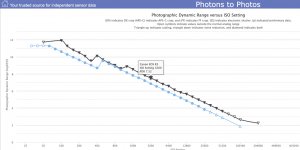
If you're not near base ISO then a jpeg can record/reproduce everything. An 8 bit sRGB jpeg is capable of ~ 12 stops DR, 8 bit tonality, and 24 bit color reproduction; 8 bit color (per channel) is also capable of more colors than a human can see (but sRGB is not). Even the D850 and Z9 don't generate more than that at ISO's above base (64). Also note that DXO's DR measurement is "engineering DR" and the first couple of stops are typically buried in noise/unusable...

Untitled-1.jpg

Often people say editing jpegs is problematic, but it generally isn't. I've already shown that it doesn't have to be (additionally) lossy; you just have to take steps to avoid it (post #40). People also say jpegs can't be edited for WB as effectively; IME that's also generally not true. For example I took this crappy image I found on the web which was already highly compressed/low data (101kb)...

Untitled-2.jpg

and color corrected it... there are still some differences, but you wouldn't know without a direct comparison (and I'm only willing to spend so much time on it).

Untitled-3.jpg

It's also not entirely true that working with raw files is "lossless"; the demosaicing applied to render the image is effectively built in. I.e. the profile applied and the calibration settings set what zero/default means for all later adjustments.
Yes, those can be edited/changed, but most don't; most just use the default "Adobe Color," "Camera Settings" (which is a jpeg render/edit anyway), or something similar.

And no matter what you started with, it cannot end up with more than a jpeg is capable of if you are exporting/using output jpegs.
There is a third scenario where raw files could be inherently better; that is when exporting other image formats/color spaces for use in printing (potentially wider color space).

 
@sk66 thank you the technical explanation, appreciated! In practice I prefer raw for when I know some editing, more than is possible with a picture profile, will be needed - so that's theatre shows with tricky lighting, and some studio.
 
What difference would there really be in starting with a jpeg and a choice of presets? (assuming you used a flat/custom profile that was suitable)
I've also played with linear profiles; but I'm not convinced there is any real benefit to them for most/uses images... I.e. you start with a custom linear profile and then use an auto adjustment to put a tone curve back into the image.
The difference for me, is that I am interested in getting the best possible image quality "starting point", in the easiest way possible, for as many images as possible.

You have consistently qualified your comments about RAW quality being no better than JPEG quality with words like "most of the time" or "usually".

The big question, is the size of the difference between "most of the time" and the "rest of the time" . And this has got to depend on what you are photographing.

I am much more interested in getting the benefits of using raw during the "rest of the time" than the benefits of using JPEGs "most of the time" Benefits, that are of little value to me.

So I don't feel I am losing anything by using Raws on the occasions when I'm not getting results better than I could get with a JPEG. But I risk losing out on quality if I'm using JPEGS when I would benefit from using RAWs. Not really relevant, but after multiple extensive periods of testing I've found, on balance, DXO (as long as you turn down the defaults) to be the best Denoising program for high ISO bird photographs, and it only works with RAW files.

I don't see any need to complicate my photography by having to worry about when I can get away with using Jpegs, and when I need to use RAW. Nor, can I be bothered with routinely taking both "just in case I need the raw". Nor do I particularly like the contrast, colours and saturation that I get from SOOC jpegs. At least not from my Nikons, or Fujis or from my Panasonics, Canons and Olympus's in the past: I've used Nikons for over 50 years, but I've also has short periods (a year or two) with other makes. I know I could probably fix the limitation of the SOOC JPEGs. but why bother when I can just use RAWs. And I might still need to use RAW for the occasions when they will give me better quality data capture.

As aside, the auto levels I use in my initial presets is customised for every image. Using a standard curve during ingest means that every image gets the same tone curve.

However, the linear curve itself isn't customised for each image, it's the same linear curve on every file. Actually it isn't a true linear curve in C1, it has a tiny lift in the shadows and a tiny drop in the highlights. If you have the CH version of C1, you can get a "scientific linear" curve, But the subscription for this version runs into the thousands of pounds.

I think it's just down to personal taste and working practices. Before defaulting to using a linear curve, I would always start with a "standard" curve, (or one of the other available curves). I, just found myself deciding on the linear curve as my preferred starting point so often that I made it the default. As I said, I find it easier to add contrast than take it away. I also like the more muted hue and saturation starting points.


FWIW, I did not intend to say/imply that you shouldn't use presets with raw files... what I meant is that if you are only applying generalized "preset" type edits there isn't any real/inherent benefit to starting with a raw file in most cases.

The poster you replied to said that they ran a preset and then tweaked individual images. and you used the term "zero advantage". albeit with a qualifier of almost or virtually (I haven't looked up the exact phrase). I now understand where you were coming from better, even if I still don't agree there are negligible benefits from starting with the raw.

With the SOOC, isn't the "preset" baked in?

With the raw plus preset, you can choose the most suitable preset from multiple presets and use a different preset for different individual files or groups of files. And you can change your mind, and go back to using a preset you had looked at earlier.

I've bought several preset packs, as I think they are great learning tools**, All have been sold as tools to speed up parts of your editing process, not as a one click way of getting to a finished image

I have seen some that are almost certainly mis- advertised by suggesting that running their preset will make your photographs look like the ones they are using in the advert, but I have no interest in these.

** I need to qualify the learning tool point because some presets come as profiles, where everything is done in the background and you can't study how they have used individual tools and combinations of tools to get a particular result. I have two sets of presets that came this way, and because of this were a complete waste of money even if they did some useful things. After an initial play, and disappointment, I've never opened them again.


But what I probably should have said is that, for most use cases there isn't a significant/inherent benefit to recording raw files in itself... i.e. for my uses recording raw files is mostly like carrying along lenses I know I'm probably not going to use. It's the "what if?" as opposed to any real benefit/need.


And this is the question... when is a raw file actually better for generating the desired result? IMO, there are two general/potential scenarios... one is if you get the exposure quite wrong; the other is if using (near) base ISO and wanting to exploit ISO invariance/recovery/DR. Otherwise there's not much to it; assuming you avoid jpeg settings that cause additional clipping/noise.

If you're not near base ISO then a jpeg can record/reproduce everything. An 8 bit sRGB jpeg is capable of ~ 12 stops DR, 8 bit tonality, and 24 bit color reproduction; 8 bit color (per channel) is also capable of more colors than a human can see (but sRGB is not). Even the D850 and Z9 don't generate more than that at ISO's above base (64). Also note that DXO's DR measurement is "engineering DR" and the first couple of stops are typically buried in noise/unusable...

View attachment 475276

Often people say editing jpegs is problematic, but it generally isn't. I've already shown that it doesn't have to be (additionally) lossy; you just have to take steps to avoid it (post #40). People also say jpegs can't be edited for WB as effectively; IME that's also generally not true. For example I took this crappy image I found on the web which was already highly compressed/low data (101kb)...

View attachment 475277

and color corrected it... there are still some differences, but you wouldn't know without a direct comparison (and I'm only willing to spend so much time on it).

View attachment 475278

It's also not entirely true that working with raw files is "lossless"; the demosaicing applied to render the image is effectively built in. I.e. the profile applied and the calibration settings set what zero/default means for all later adjustments.
Yes, those can be edited/changed, but most don't; most just use the default "Adobe Color," "Camera Settings" (which is a jpeg render/edit anyway), or something similar.

And no matter what you started with, it cannot end up with more than a jpeg is capable of if you are exporting/using output jpegs.
There is a third scenario where raw files could be inherently better; that is when exporting other image formats/color spaces for use in printing (potentially wider color space).
 
Another Beginners post that is becoming too complicated :p
 
Another Beginners post that is becoming too complicated :p
Many posts (whatever the forum) snowball like this as people respond to different aspects of what was being posted.

I'm not sure how you prevent it happening, especially, if the trigger for the snowballing might be seen as something misleading for a beginner.

Wasn't the "beginners" part answered early on ?
 
@myotis

Another side to this 'argument' - for me at least - is that importing a RAW to the hard drive through LR is pretty easy, and it sits there in its indestructible form. When edited, the jpeg sits in the same folder, fully visible, next to its RAW 'icon' file. So clear to see what is what and no chance of ever saving an edited jpeg and over writing the original jpeg.

Also, imagine you do shoot something that you need in RAW (such as astro photography etc) and you forget to switch back to RAW + jpeg..... I know someone who done that, and had to drive back to Exmoor for 2 hours the following night to re-shoot. Luckily, we had two clear nights in a row at the time.
 
@myotis

Another side to this 'argument' - for me at least - is that importing a RAW to the hard drive through LR is pretty easy, and it sits there in its indestructible form. When edited, the jpeg sits in the same folder, fully visible, next to its RAW 'icon' file. So clear to see what is what and no chance of ever saving an edited jpeg and over writing the original jpeg.

Also, imagine you do shoot something that you need in RAW (such as astro photography etc) and you forget to switch back to RAW + jpeg..... I know someone who done that, and had to drive back to Exmoor for 2 hours the following night to re-shoot. Luckily, we had two clear nights in a row at the time.
Although, I haven't mentioned it, this is also part of my workflow. in that I know that any JPEG on my drive is an "output" image and any raw file is an "original" . TIFFS are intermediate masters, PSDs or PSBs have had "advanced" editing, and DNGs have gone through noise reduction.
 
You have consistently qualified your comments about RAW quality being no better than JPEG quality with words like "most of the time" or "usually".
I don't like to use absolute statements, because absolute statements are always wrong...
With the SOOC, isn't the "preset" baked in?
Yes, just as the demosaicing of the raw data is also (essentially) baked in.

But if the camera is not generating information that requires 14 bit data/accuracy then there isn't anything to lose from recording it with less accuracy/data (as a jpeg). E.g. you photograph a scene that only has 5 stops of dynamic range in it; there is no benefit to recording that scene with a sensor capable of recording 12 stops of dynamic range and 14 bit data (1 stop requires 1 bit in linear raw). And there is no problem recording that scene as a jpeg (as long as the jpeg settings do not cause additional losses). I.e. anytime you use an ISO above base you are recording less dynamic range; and a digital sensor doesn't actually record color...

People get tied up about bit depth/accuracy, but most of the information about it on the web is misleading IMO. I.e. the difference between 13 bit and 14 bit is over 8000 values (8192 - 16,384). But that is largely pointless because a human can only perceive about 7 steps/values within that range (cone cells/daylight vision), so all of those other values are largely redundant/pointless... it's like using millimeters to measure to the nearest meter. And that's why tone curves are effective/necessary; they take linear data and present it more logarithmically; the way human perception works.

This is what an undemosaiced raw file looks like...

DSC_5492 - undemosaiced by Mark S. Abeln, on Flickr

That is pretty useless. How it gets to the point of being a useful/pleasing image is fairly irrelevant.
 
Also, imagine you do shoot something that you need in RAW (such as astro photography etc) and you forget to switch back to RAW + jpeg
You would have to explain to me why astro photography requires raw files... I suppose certain software could impose the requirement.

But there is certainly no point in recording/storing files you are not going to use. I am only recording raw files with my Z9; although I am using the most compressed/lossy format.
And if you are only using the jpegs there is no point in filling up your drives/storage with adjacent raw files. I.e. when I do use raw+jpeg the raw files never get imported unless I think I might be able to do a better job starting from there (usually mistakenly).
 
For the Milky Way, definitely raw is the way to go, based on my practical experience. It's an extreme dynamic range in a dark scene, tricky white balance, often quite high ISO, and more bit depth helps a lot. Raw gives a lot more flexibility. I remember well, as I have made the same mistake as the person @LeeRatters mentioned and forgot to record in raw one night!
 
I don't like to use absolute statements, because absolute statements are always wrong...

Yes, just as the demosaicing of the raw data is also (essentially) baked in.

But if the camera is not generating information that requires 14 bit data/accuracy then there isn't anything to lose from recording it with less accuracy/data (as a jpeg). E.g. you photograph a scene that only has 5 stops of dynamic range in it; there is no benefit to recording that scene with a sensor capable of recording 12 stops of dynamic range and 14 bit data (1 stop requires 1 bit in linear raw). And there is no problem recording that scene as a jpeg (as long as the jpeg settings do not cause additional losses). I.e. anytime you use an ISO above base you are recording less dynamic range; and a digital sensor doesn't actually record color...

People get tied up about bit depth/accuracy, but most of the information about it on the web is misleading IMO. I.e. the difference between 13 bit and 14 bit is over 8000 values (8192 - 16,384). But that is largely pointless because a human can only perceive about 7 steps/values within that range (cone cells/daylight vision), so all of those other values are largely redundant/pointless... it's like using millimeters to measure to the nearest meter. And that's why tone curves are effective/necessary; they take linear data and present it more logarithmically; the way human perception works.

This is what an undemosaiced raw file looks like...

DSC_5492 - undemosaiced by Mark S. Abeln, on Flickr

That is pretty useless. How it starts being a useful/pleasing image is fairly irrelevant.
I think, I'm going to bow out of this.

The technical points you have been raising in your posts are things I already know and I don't disagree with, but I don't see as relevant to the core argument I started with (using presets with raw files) or the secondary argument you introduced on the broader JPEGs vs RAW argument.

I just feel that every post now sees me agreeing with the technical points you raise, but then repeating, in some form or another, why I choose to use presets with raw files, and use raw files over Jpegs.

It has still been an interesting discussion, as I had (for reasons that should be obvious from my posts) never really given Jpegs much consideration, as I have had no reason to consider using them.
 
Last edited:
You would have to explain to me why astro photography requires raw files... I suppose certain software could impose the requirement.

But there is certainly no point in recording/storing files you are not going to use. I am only recording raw files with my Z9; although I am using the most compressed/lossy format.
And if you are only using the jpegs there is no point in filling up your drives/storage with adjacent raw files. I.e. when I do use raw+jpeg the raw files never get imported unless I think I might be able to do a better job starting from there (usually mistakenly).

Tim answered the first one really so no point in repeating things. Again.

There is also a button or function on most computers or laptops which allows you to delete things. My important and special things I will keep the RAW's. Car meets and general things and hundreds of timelapse frames I will go through on a spare afternoon now and then and delete them. So I'm not filling up my storage with RAW files.... But telling you how I do things is yet again, generally repeating myself.

I still don't know how to get the Aerochrome look straight out of camera on jpeg either yet. I guess I never will though.
 
For the Milky Way, definitely raw is the way to go, based on my practical experience.
I can certainly see how it would be easier as setting up jpeg recording to ensure you get the most out of it kind of defeats the purpose (flat profile, wrong color space, etc). But this part doesn't make sense.
extreme dynamic range... often quite high ISO, and more bit depth helps a lot.
If you are using an elevated ISO you are necessarily recording a lower dynamic range, and the sensor is generating less bit depth/accuracy... you can't have both.

A sensor is capable of recording a minimum (shadows, low bit depth required, high noise) and a maximum (highlights, higher bit depth, low noise). But the only time it records the maximum is at base ISO... any other time the amplification pushes the max into clipping. I.e. you only use a higher ISO because the maximum doesn't exist in the scene, or you don't care about clipping it. Likewise, raising the ISO does not make the sensor data more accurate/less noisy. E.g. at ISO 3200 my Z9 only generates ~ 7 bits of data/accuracy and 7 stops of usable dynamic range, and your R3 is about the same...

Untitled-1.jpg
 
Last edited:
I agree that DR decreases as ISO rises in an engineering sense. But in astro, I’m not trying to preserve highlight headroom, I’m trying to extract faint shadow signal without banding or baked-in tone curves.

In my experience, the practical advantage of Raw isn’t about base ISO DR; it’s about having linear 12 to 14-bit data to stretch and control noise, rather than an 8-bit JPEG with NR and contrast already applied.

And let’s be real, in the middle of the night, after trekking up a snowy mountain, freezing cold, I don’t really have the time or energy to fine-tune JPEG settings to perfection
 
there’s a similar discussion going threads, in which there was a reply from David Alan Harvey (I know, controversial figure) says he shoots raw as proof of authorship as it’s a one of a kind. Not sure if it stacks up, but worth thinking about.
 
Back
Top